

The lifecycle of a conversation
Every conversation, on any channel, moves through the same stages. The agent’s Workflow tab shows these stages in order.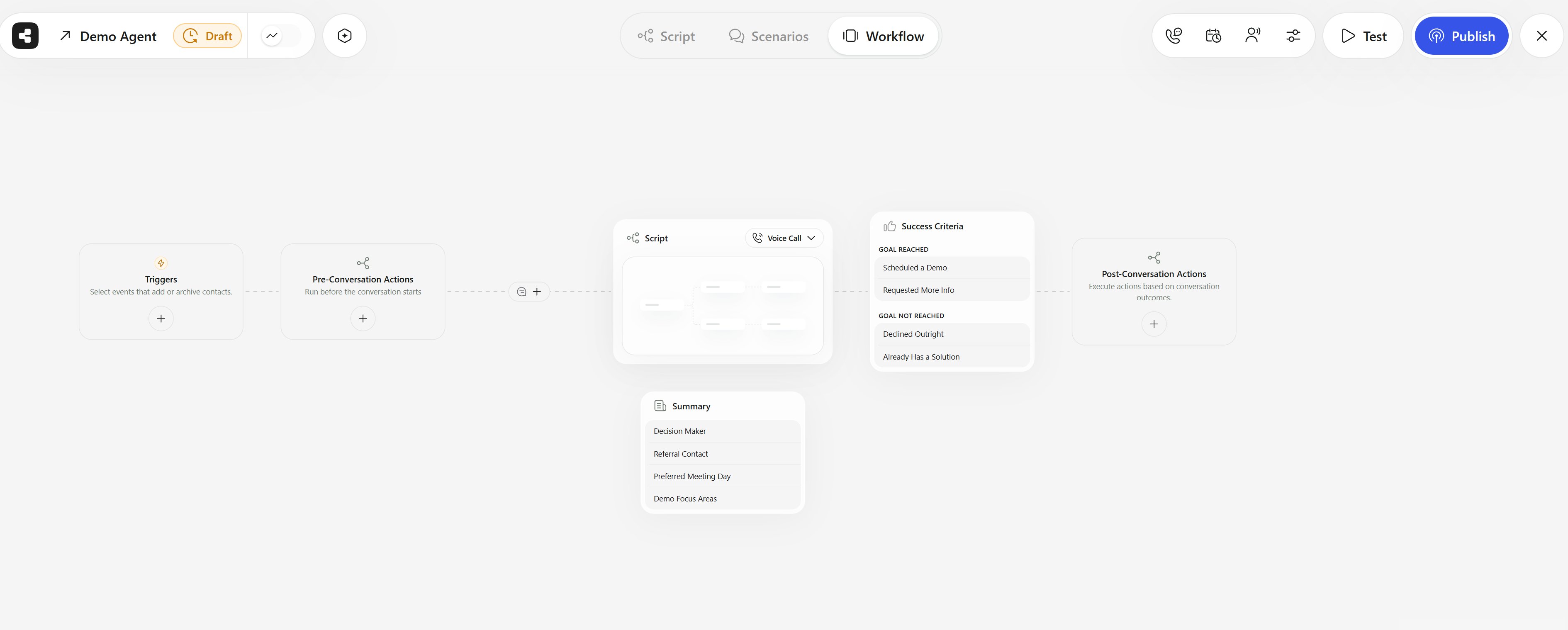
The Workflow tab of an agent: Triggers, Pre-Conversation Actions, Script, Summary, Success Criteria, and Post-Conversation Actions.
Agents
An agent is one AI worker with one job: for example, “confirm tomorrow’s appointments” or “answer the support line”. It bundles the script, voice, channels, knowledge, actions, schedule, contacts, and results for that job. Agents have a type and a direction:
Outgoing agents start conversations with the contacts you add. Incoming agents answer calls or messages that come in.
Agents were called “campaigns” until September 2026. The API and webhook payloads still use the old name in places, such as the
campaign object and campaignId fields.Channels
A channel is how the agent reaches people:- Voice: outbound and inbound phone calls over a number managed by Callers, Twilio, Telnyx, or your own SIP trunk, and web calls in the browser.
- Text: SMS through Twilio or Telnyx, and WhatsApp.
- Email: Gmail, Outlook, SendGrid, Mailjet, or any SMTP/IMAP mailbox.
Scripts
The script is the conversation flow, drawn as a canvas of connected blocks.- Blocks (nodes) are stages of the conversation, such as “Greeting” or “Qualify budget”. A block can branch into subflows depending on what the contact says, or jump to another block with Go to Block.
- Steps are what happens inside a block: say something, ask a question, transfer the call, send an SMS or email, book a meeting, run an action, wait, or end the call.
- Scenarios handle moments that can happen anywhere, like “How much does it cost?” or “Call me later”. When the contact says something that matches a scenario, the agent runs that scenario’s steps and then returns to the flow.
- Instructions are hidden guidance for the AI, at the agent level or inline in a step. They shape tone and behavior without being spoken.
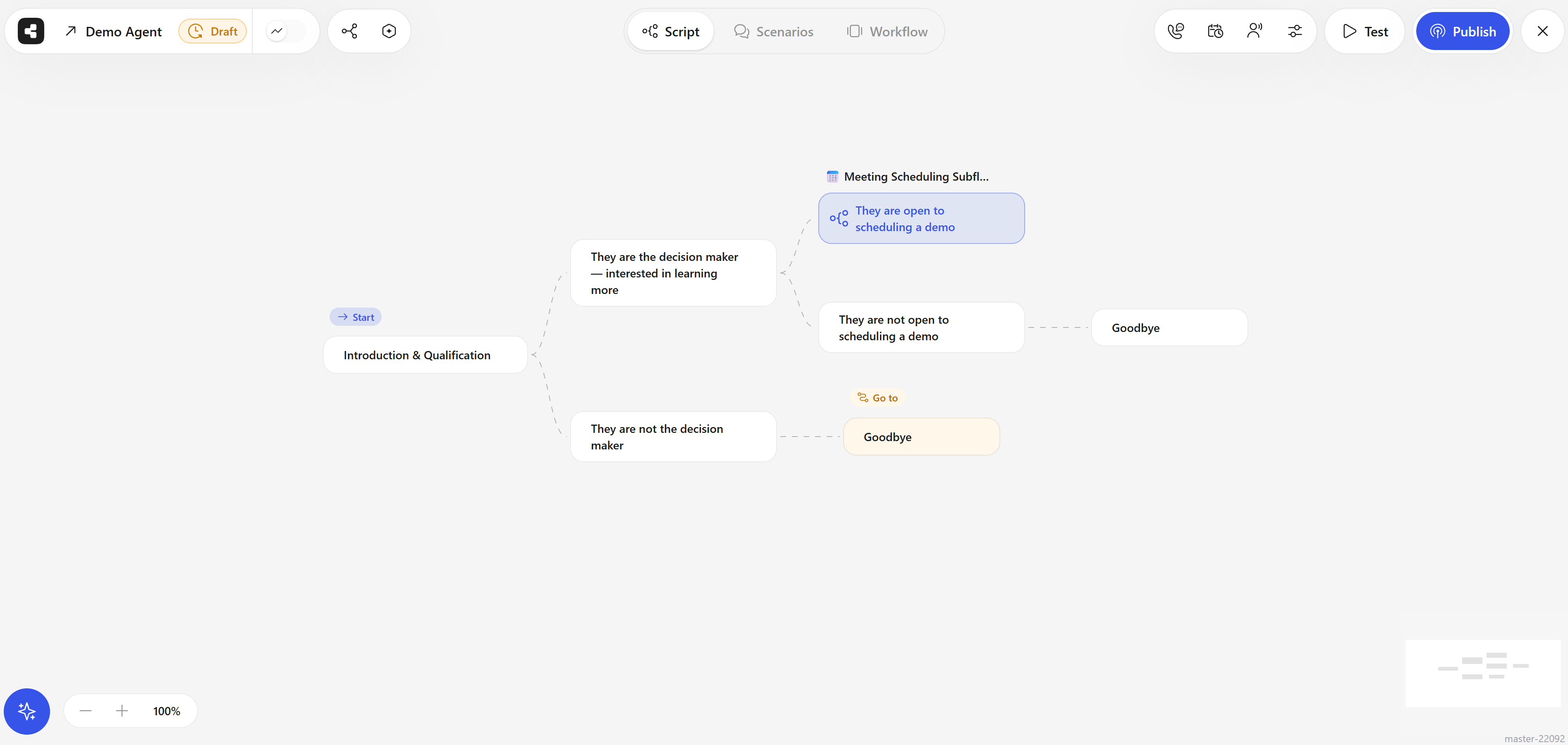
A script on the canvas: a Start block, subflows for each kind of reply, a nested script, and Go to links.
Variables
Variables personalize each conversation. Write{{name}} or {{appointment_time}} in the script, and Callers fills the value for each contact from:
- CSV columns you map during import, or the
dataobject you send with the API. - Pre-conversation actions that fetch data before the call.
- Built-in values such as
{{currentDate}}.
Knowledge bases
A knowledge base is a set of documents, web pages, and text the agent can search during a conversation to answer questions accurately. Create knowledge bases under Knowledge and connect them to agents. Supported sources include PDF, Word, PowerPoint, spreadsheets, text files, images, and website URLs.Actions
Actions connect the agent to your systems. They run at three points:
An action can be an App Center action, a custom HTTP request, or custom code.
Contacts and statuses
A contact is a person the agent talks to: a name, one or more phone numbers or an email address, and data for variables. Each contact has a status that tells you where it stands, such as New, Pending Retry, Interested, Not interested, Call later, Do not call, Wrong number, or Unreached. Callers decides when to contact each person based on the agent’s availability (calling hours and time zone) and retry rules (total attempts, daily attempts, wait between attempts).Success criteria and post-call analysis
After each conversation, Callers analyzes the transcript:- Success criteria define whether the agent reached its goal (“goal reached”) and classify other outcomes such as call later, wrong number, or do not call. They drive the contact status and which post-call actions run.
- Post-call analysis produces a summary and answers your key questions: structured fields such as “Budget” (number), “Preferred date” (date), or “Has insurance?” (yes/no).
Webhooks and triggers
- Webhooks send conversation events and results to your URL: when a call is dialing, connected, finished, and when post-call analysis is done, with the transcript, summary, and recording link.
- Triggers work in the other direction: an event in a connected app (for example, a new CRM lead) adds or archives a contact in an agent automatically.
Versions
Agents can have versions. You edit a Draft, then Publish it; only published versions take real conversations. Version history lets you restore an earlier version. With split traffic, you can run several published versions side by side and compare their results.Accounts and subaccounts
Your account (organization) holds your agents, contacts, numbers, integrations, and team. Members have a role (Admin or ReadOnly) plus member access settings, such as whether they can see contact phone numbers or export data. Agencies and larger companies can create subaccounts: separate accounts for each client or business unit, managed from one parent account and optionally presented under your own brand with white label.Related
Quickstart
Build and launch your first agent.
Glossary
Short definitions of every term in Callers.