

The Phone Numbers page is available to admins.
Where numbers come from
Numbers are grouped on the page by source:
Each number shows its country flag, location, and a tag when it’s limited to one direction: Only Outgoing, Only Incoming, or Only SMS. Hover over a number to see which agents use it.
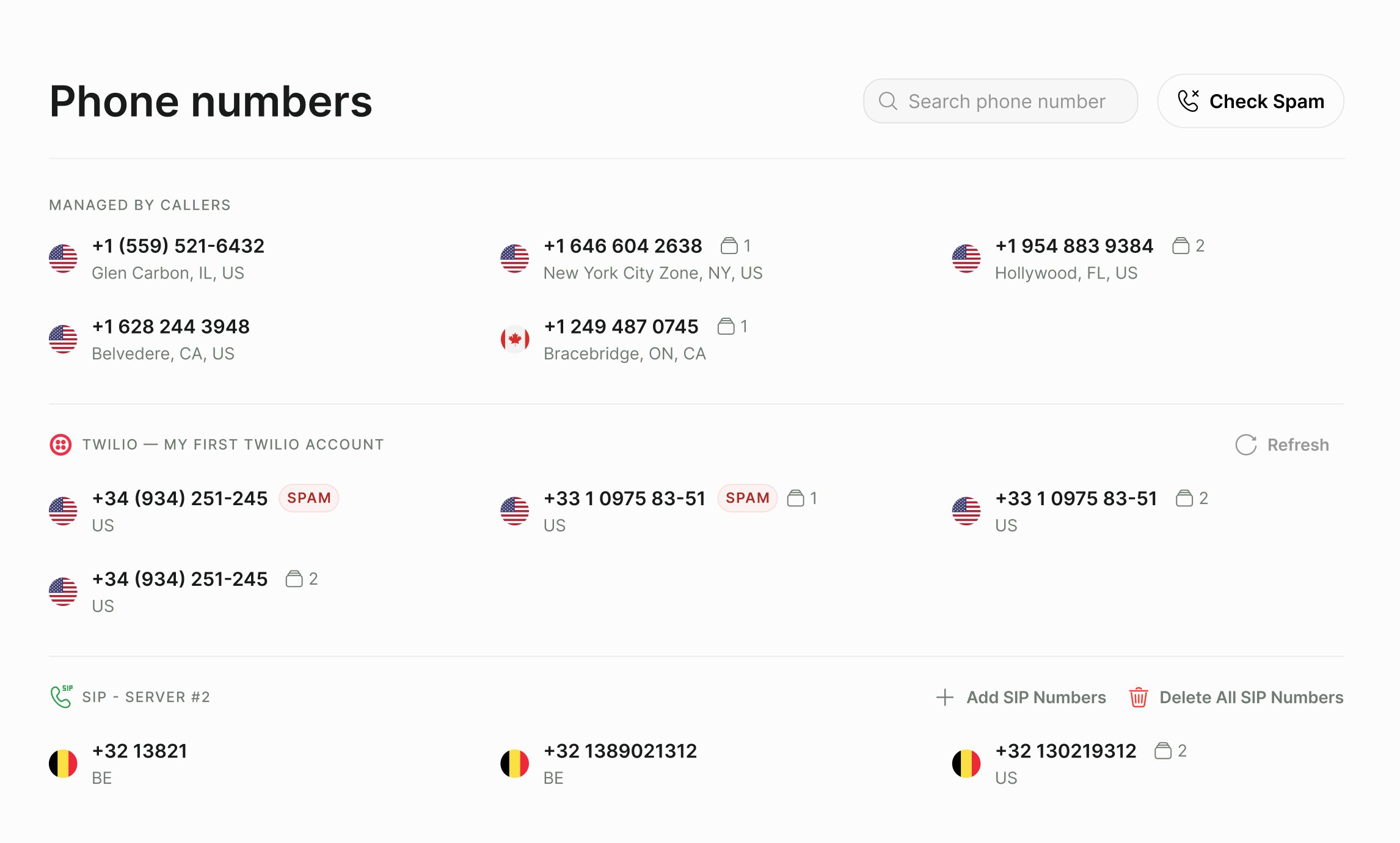
The Phone numbers page grouped by source, with the Check Spam button at the top.
Add numbers
- Buy a number
- Twilio
- Telnyx
- WhatsApp
- SIP
Click Buy at the top of the page, then Buy number to confirm. A US local number is added to your account. It supports both incoming and outbound calls.If you don’t see Buy, buying numbers isn’t available for your account yet. Contact support@callers.ai.
Assign numbers to an agent
1
Open the agent's channels
Open the agent, click Edit, open the general settings, and select the Voice Channels card (Text Channels for text agents).
2
Select numbers
Under Phone numbers, search and tick the numbers this agent should use. Select several numbers to spread outbound calls across them.
3
Choose a dialing strategy
With more than one number selected on an outbound agent, choose a Dialing Strategy (see below).
Dialing strategies
When an outbound agent has several numbers, the dialing strategy decides which one each call comes from.Local dialing
Turn on Local Dialing under the agent’s Technical Settings to dial contacts in local number format. Contacts can then be added without a country code, and any non-empty number is accepted at import. Use it when your SIP carrier expects national-format numbers.This feature is enabled per account. Contact support@callers.ai to turn it on.
Spam checks
Carriers and call-blocking apps can label a number as spam, which sends calls to voicemail or blocks them and lowers your answer rate. For more ways to raise pickup, see Improve answer rates.- Check one number: click Check Spam, enter an international phone number, and click Check for Spam. The result is either Spam Risk Detected or No Spam Detected.
- Automatic checks: Callers checks your numbers in the background, starting with the ones agents actively use. Flagged numbers show a SPAM badge on the Phone Numbers page.
- Notifications: when a number used by an agent is newly flagged, you get a notification naming the number and the agent.
This feature is enabled per account. Contact support@callers.ai to turn it on.
Duplicate contacts per number
By default, each phone number can appear only once in an agent’s contacts; importing it again updates the existing contact. Turn on Allow Duplicate Phone Numbers under Technical Settings to keep several contacts with the same number, for example several people reached through one office line.Remove a number
You can delete numbers that are Managed by Callers and SIP numbers from the Phone Numbers page. If agents use the number, you’ll see which ones and can click Disconnect All to remove it from them first. Twilio, Telnyx, and WhatsApp numbers are managed in those providers’ own consoles.Troubleshooting
A new Twilio or Telnyx number doesn't appear
A new Twilio or Telnyx number doesn't appear
Click Refresh in that provider’s section. New numbers can take a moment to sync.
I can't select a number for my inbound agent
I can't select a number for my inbound agent
The number already answers calls for another agent. Remove it from that agent first.
The Dialing Strategy option isn't shown
The Dialing Strategy option isn't shown
It appears only on outbound agents with more than one number selected.
My answer rate dropped suddenly
My answer rate dropped suddenly
Check for SPAM badges on your numbers. Replace flagged numbers and spread calls across more numbers.
Related
Telephony
Connect your own carrier or SIP trunk.
Scheduling and retries
Control when and how often contacts are dialed.
Do Not Call list
Block numbers that must not be called.
Notifications
Get alerts when a number is flagged.