

Prerequisites
- An active Squaretalk account
- Your Callers account credentials
Step 1: Get Connection Details from Squaretalk
Contact your Squaretalk account manager and request the following:- SIP URL: Your Squaretalk SIP endpoint (typically
lb-sbc.squaretalk.com) - Tech Prefix: A prefix used by Squaretalk to identify and route your outgoing calls
- Phone Numbers: The numbers assigned to your account that you will connect in Callers
For inbound calls to Callers, ask Squaretalk to whitelist our IP address:Alternatively, you can use DNS:
sip.callers.aiImportant: This IP/DNS can only be used for inbound calls to Callers. It cannot be added to your allowed IPs list for receiving outbound calls from us.Step 2: Configure SIP in Callers
- Go to the App Center tab on your Callers dashboard
- Find SIP under the
TELEPHONY & COMMUNICATIONsection - Click on the
plusbutton in the SIP Integration block - Configure your SIP with the following settings:
- SIP Name: Enter a descriptive name (e.g., “Squaretalk Outbound Trunk”)
- E.164 syntax: Enable to prepend a leading + on origination attempts
- Outbound authentication: Leave disabled — Squaretalk uses IP-based routing with a tech prefix, no username/password is required
- Tech prefix: Enable and enter the prefix provided by Squaretalk
- SIP Diversion Header: Leave disabled
- In the SIP Gateways section, configure the gateway:
- Gateway Type: Outgoing, Incoming, or both — depending on how you plan to use the trunk
- URL:
lb-sbc.squaretalk.com(or the endpoint provided by Squaretalk) - Port: 5060
- Protocol: UDP
- Click
Save Changes
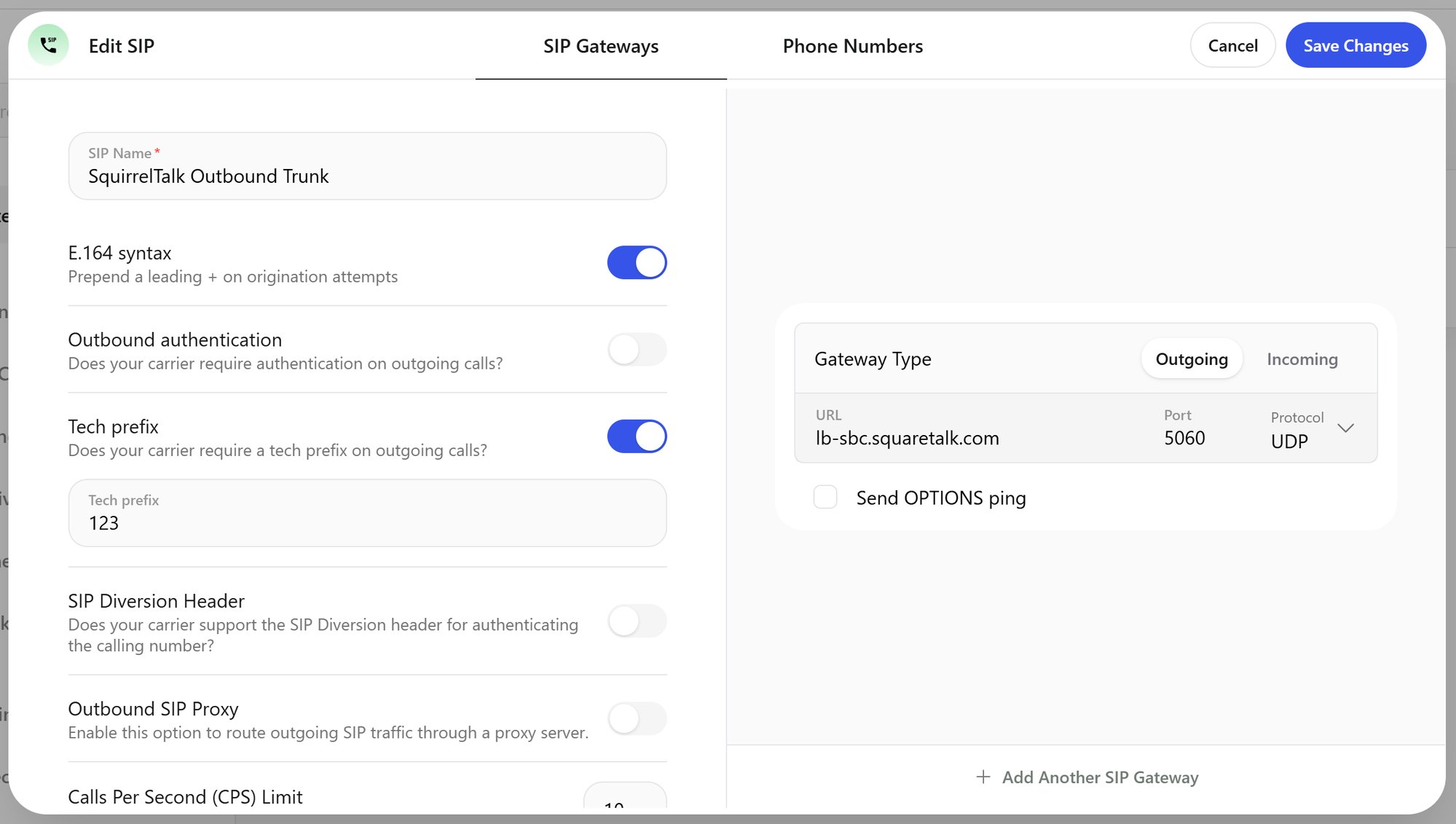
Squaretalk SIP configuration in Callers
To use the same gateway for both directions, add it with both types or enable Gateway Configuration. For incoming calls, make sure Squaretalk has whitelisted the Callers IP address (see Step 1).
Step 3: Add Phone Numbers in Callers
- Go to the Phone Numbers tab of your SIP configuration
- For each number provided by Squaretalk:
- Enter the full E.164 format (e.g., +12025550123)
- Enable “Use for outbound calls” if needed
Important Notes
- Authentication: Squaretalk uses IP-based routing with a tech prefix — no username/password is required
- E.164 Format: All phone numbers must use the format [+] [country code] [area code] [number]
- Inbound Calls: Callers’ IP (
35.245.182.192) must be whitelisted on the Squaretalk side for inbound calls to work - Account-Specific Settings: The tech prefix is unique to your Squaretalk account — always confirm it with your account manager
For optimal performance:
- Test both inbound and outbound calling before going live
- Contact Squaretalk support if calls fail to connect — routing may need to be adjusted on their side