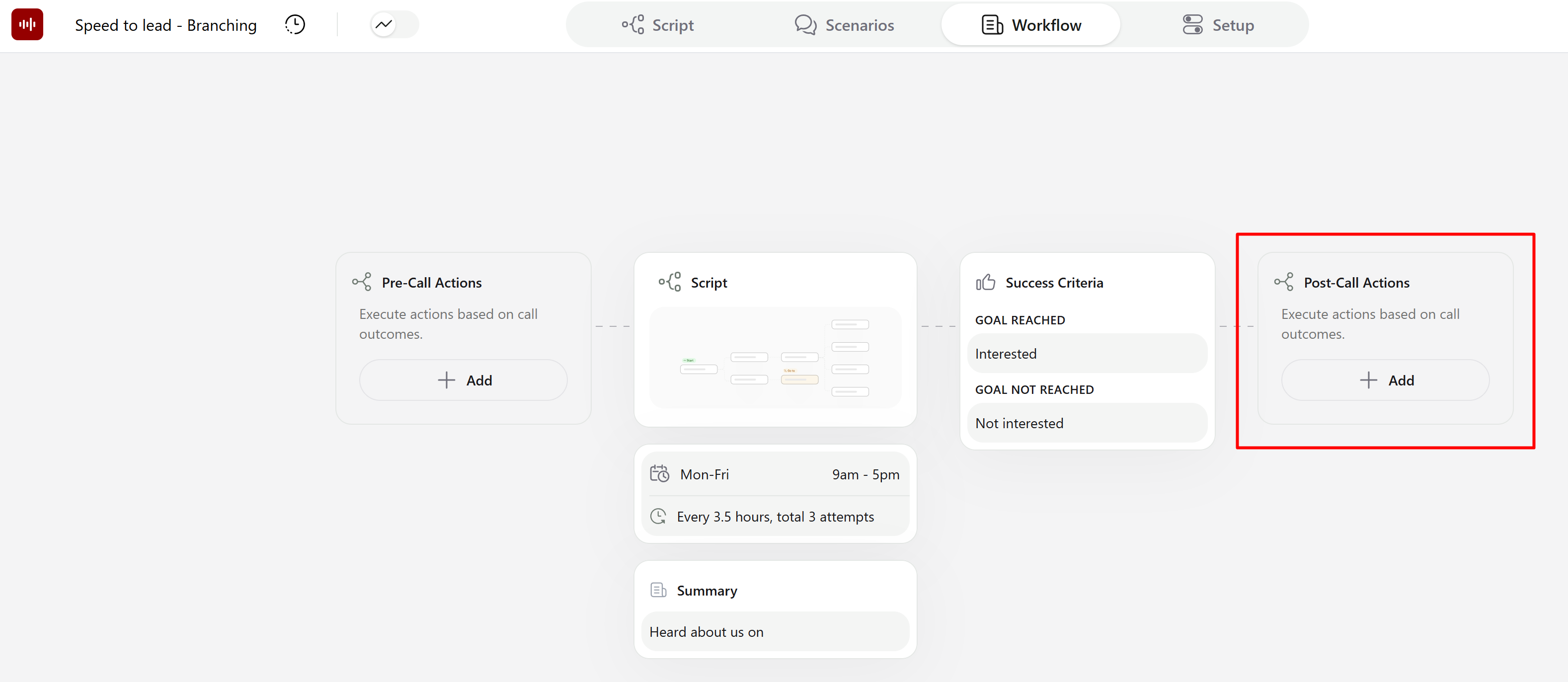
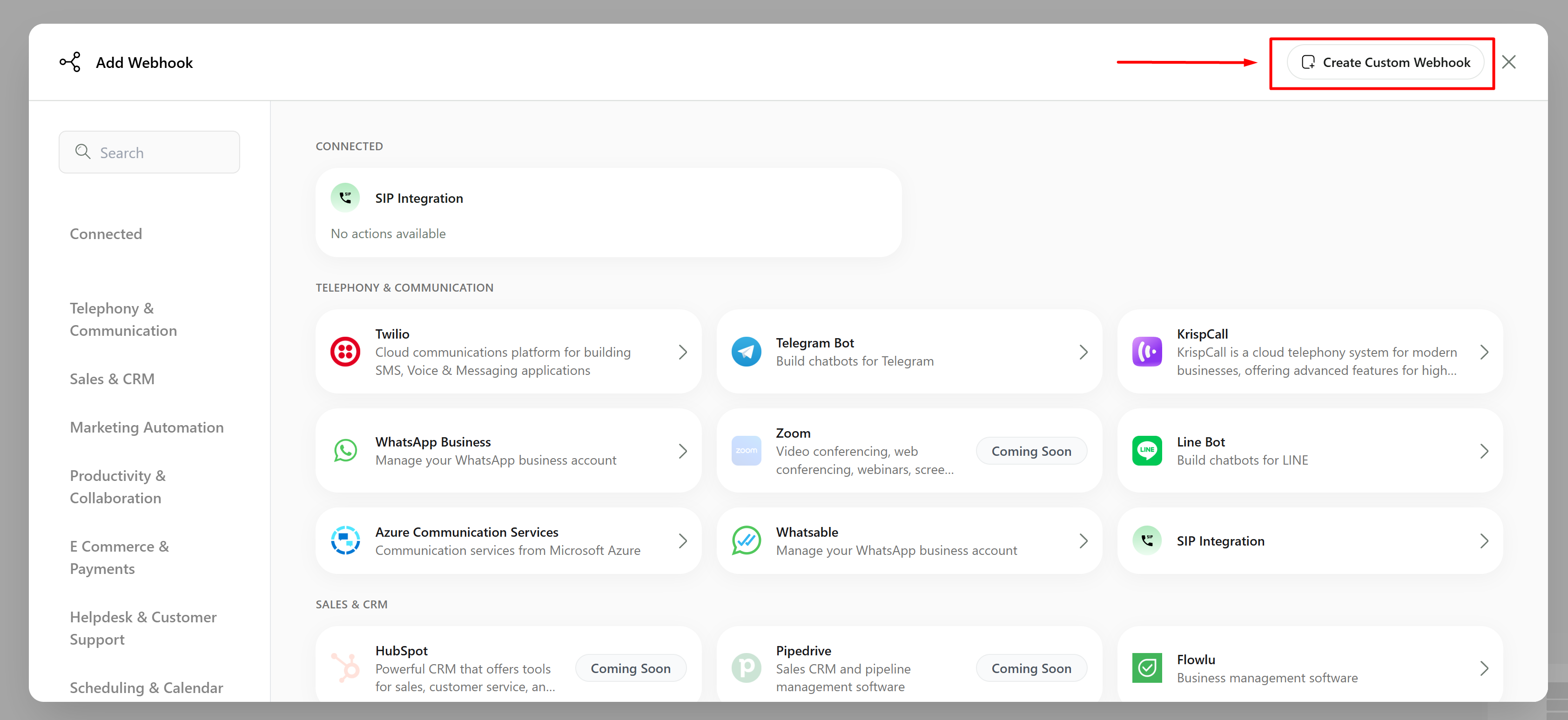
 In the opened window, you can select the action that will be executed after a call. We offer a wide range of integrations that can be used, but for this guide, we'll focus on the **Create Custom Webhook** button in the upper-right corner.
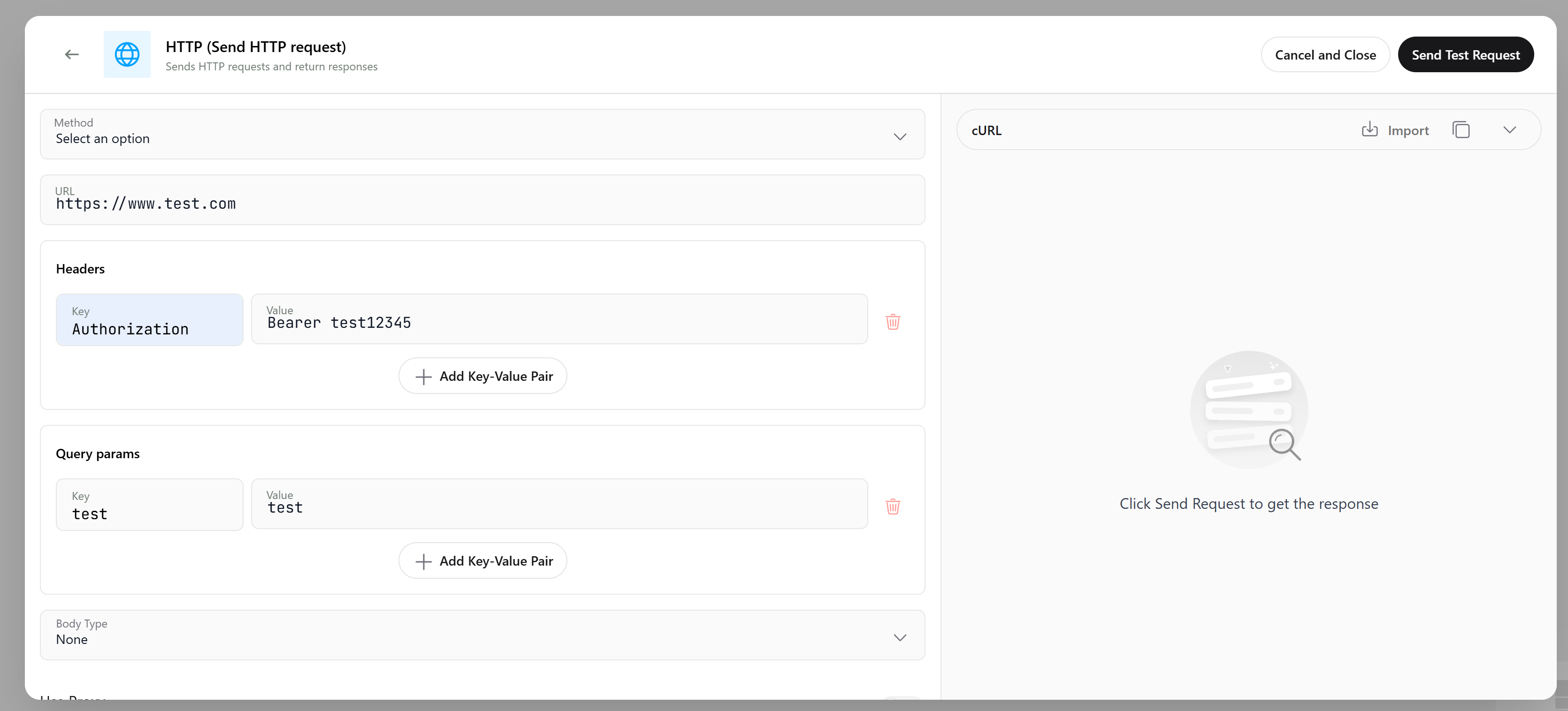
 ### Configure an Advanced Webhook
In the webhook editor, you can flexibly configure your HTTP request. First, you need to enter the **URL** where you will send the request and select the **HTTP Method** (`GET`, `POST`, `PUT`, `PATCH`, or `DELETE`). Then configure **Headers** for authorization (if needed) and add **Query Parameters** (if needed) that will be prepended to the URL.
### Configure an Advanced Webhook
In the webhook editor, you can flexibly configure your HTTP request. First, you need to enter the **URL** where you will send the request and select the **HTTP Method** (`GET`, `POST`, `PUT`, `PATCH`, or `DELETE`). Then configure **Headers** for authorization (if needed) and add **Query Parameters** (if needed) that will be prepended to the URL.
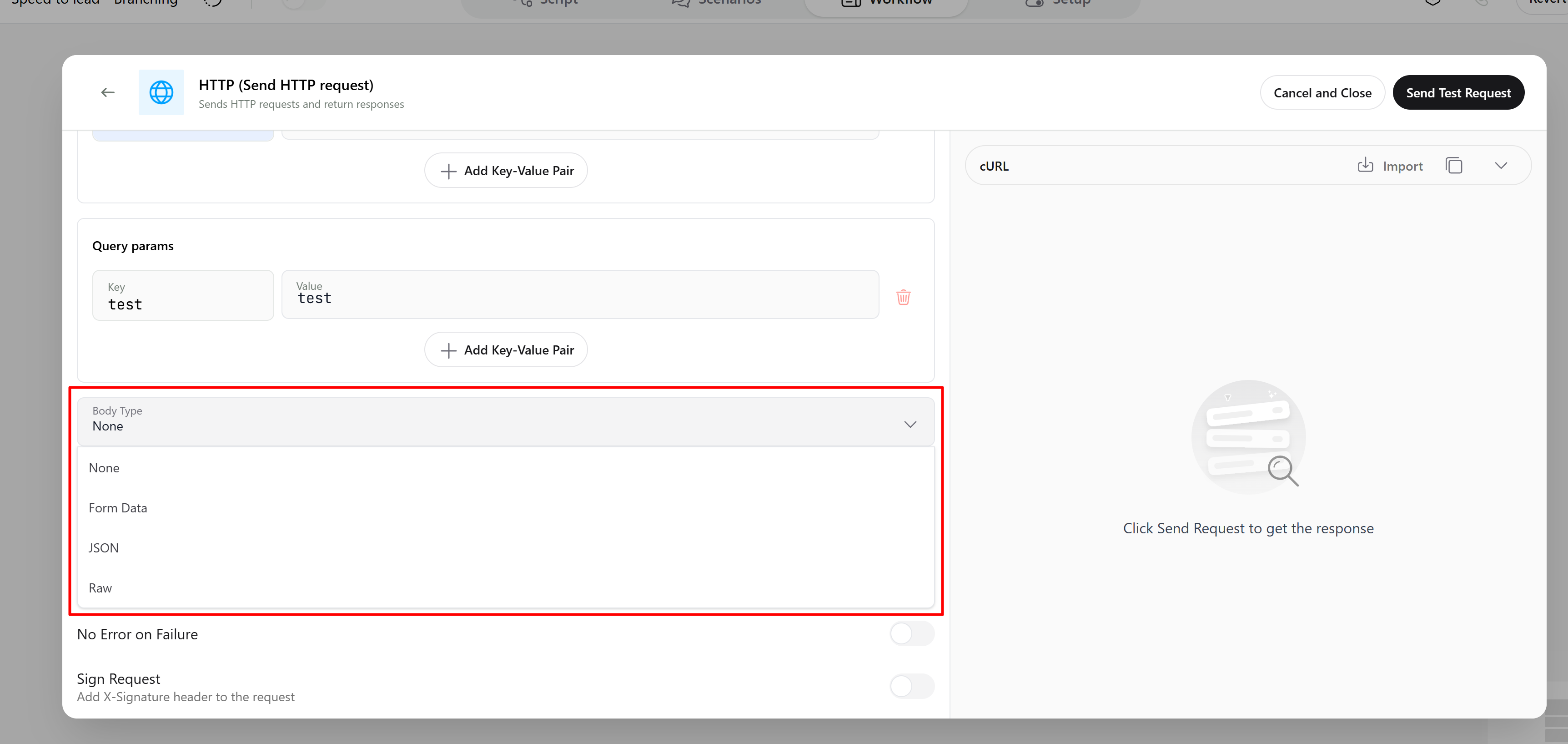
 Next, you can configure the **Request Body**. First, select one of the available formats: **Form Data**, **JSON**, or **Raw**.
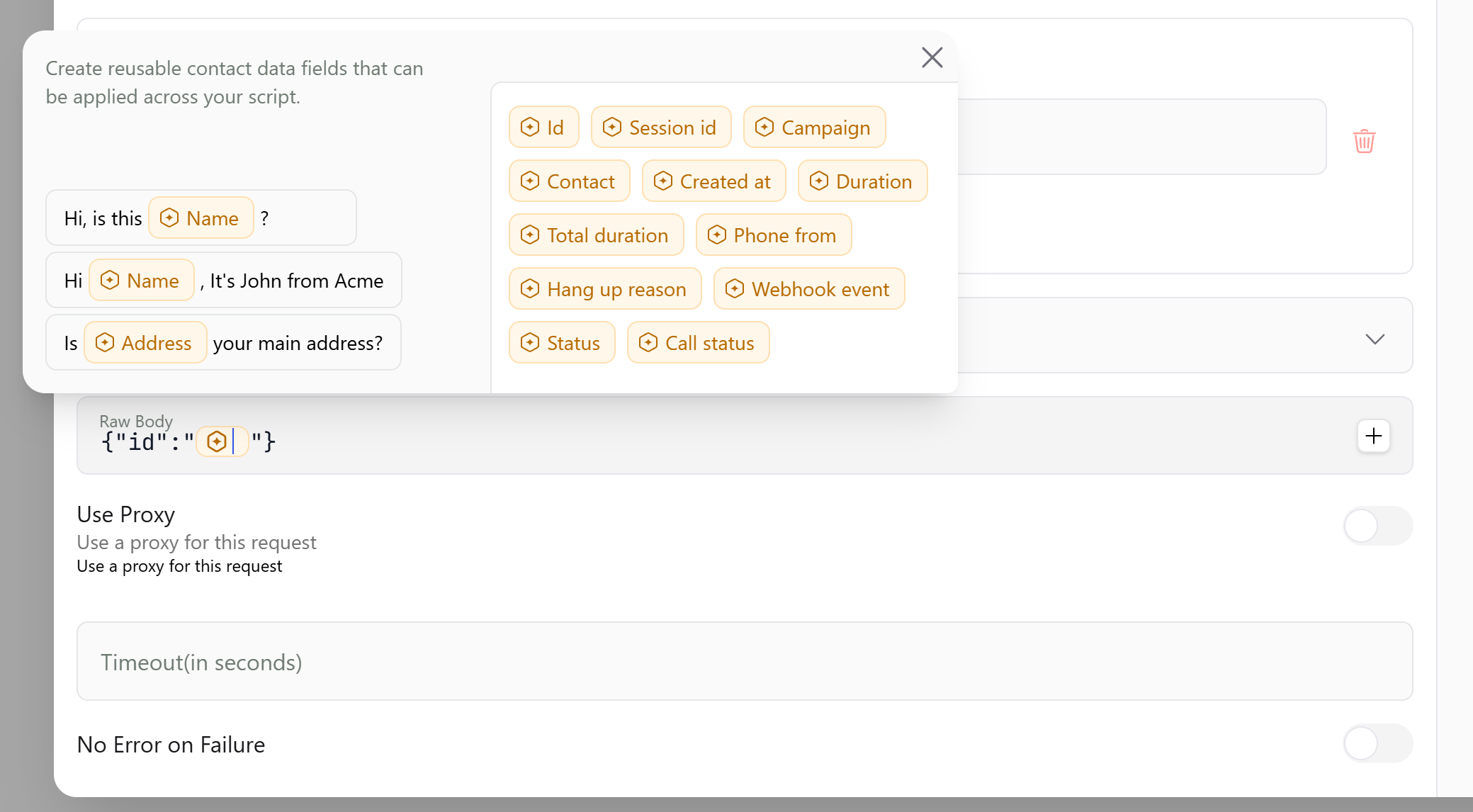
 After selecting the format, you need to write the request body itself. Here you can use the standard variables we provide as values, and custom variables configured through **Key Questions** will also be available. (Learn more about Key Questions [here](/documentation/using-callers/key-questions)).
 ### Import cURL Configuration
In addition to manual configuration, you can set up the entire request by importing a cURL command.
### Import cURL Configuration
In addition to manual configuration, you can set up the entire request by importing a cURL command.
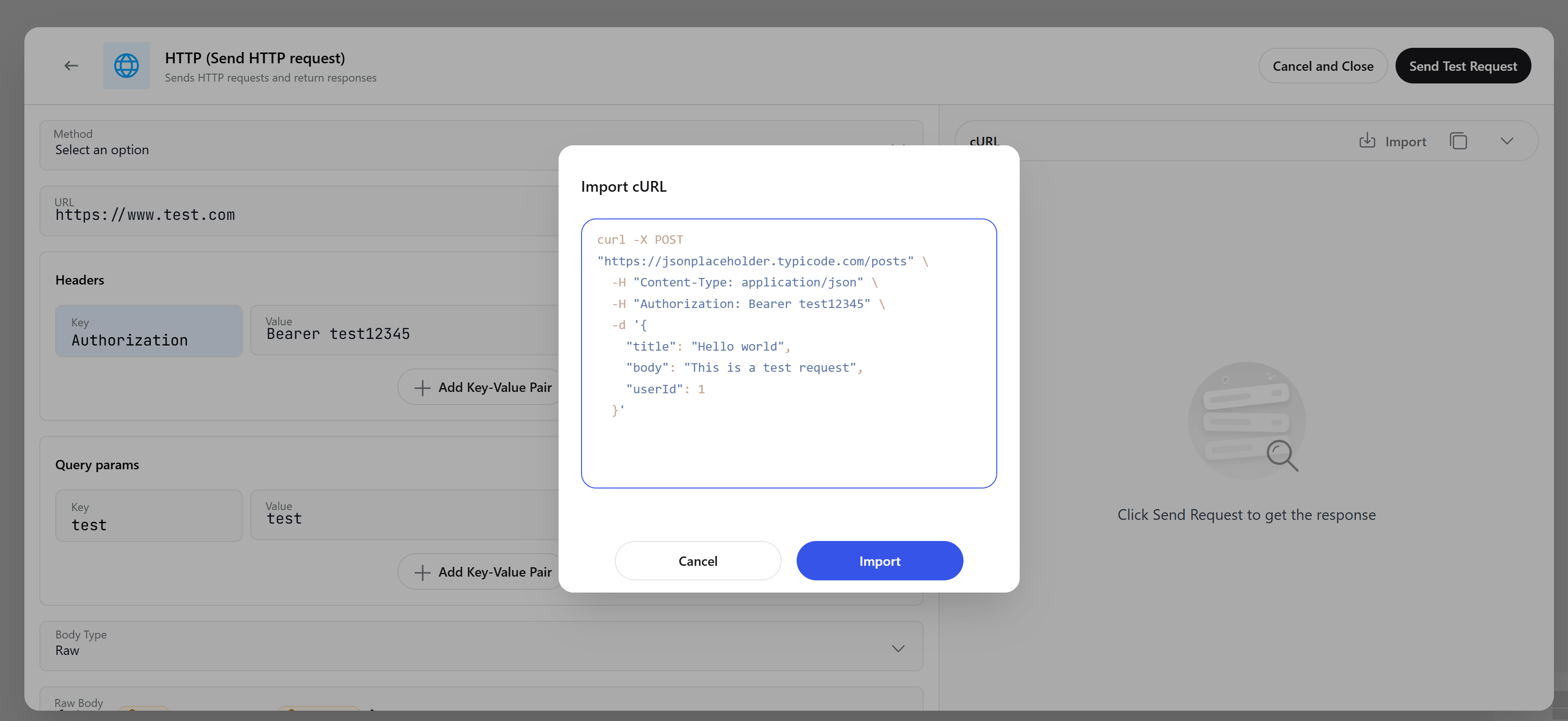
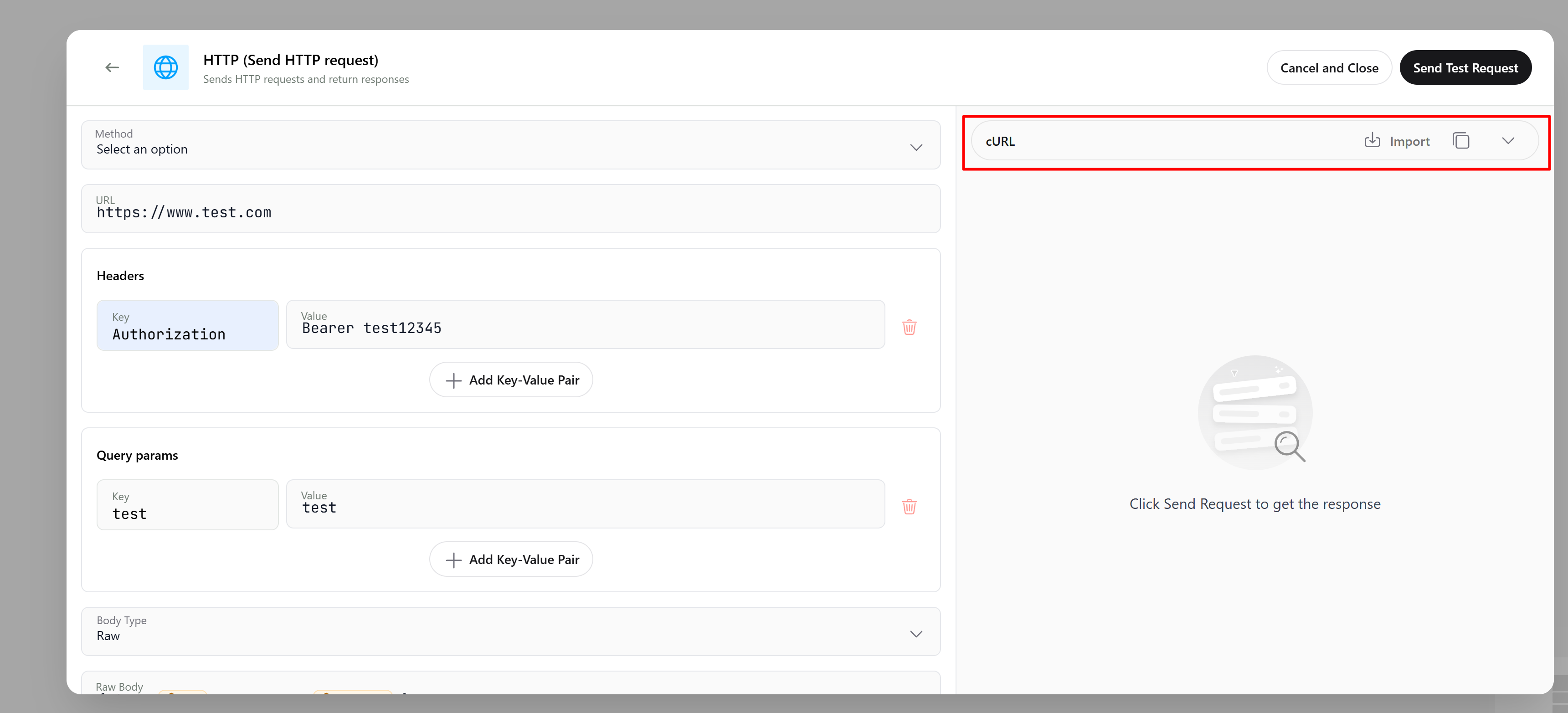 To do this, find the **Import** button in the upper-right corner, and in the opened window, paste your cURL command and click the **Import** button again.
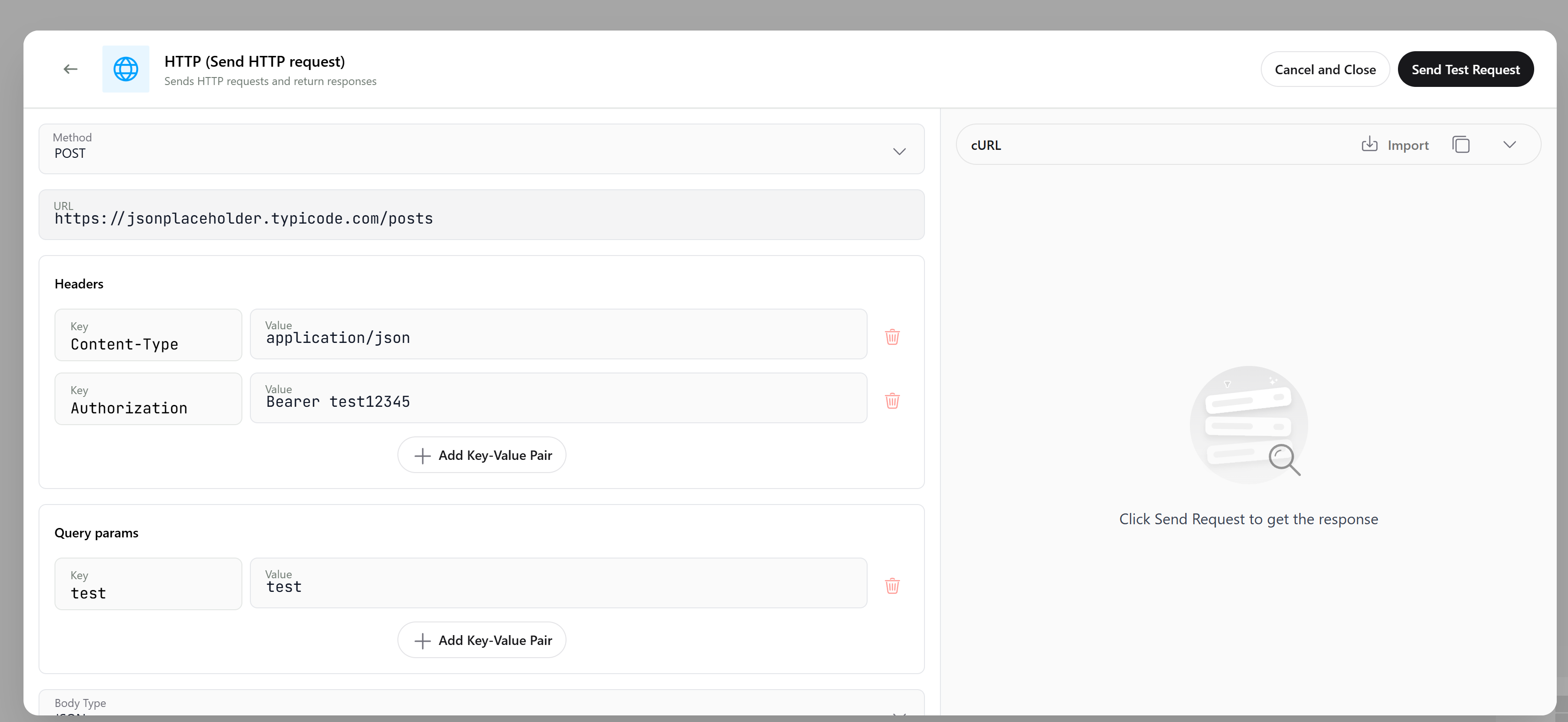
 All necessary values will automatically populate in the method, URL, headers, parameters, and body.
 ### Testing Your Webhook
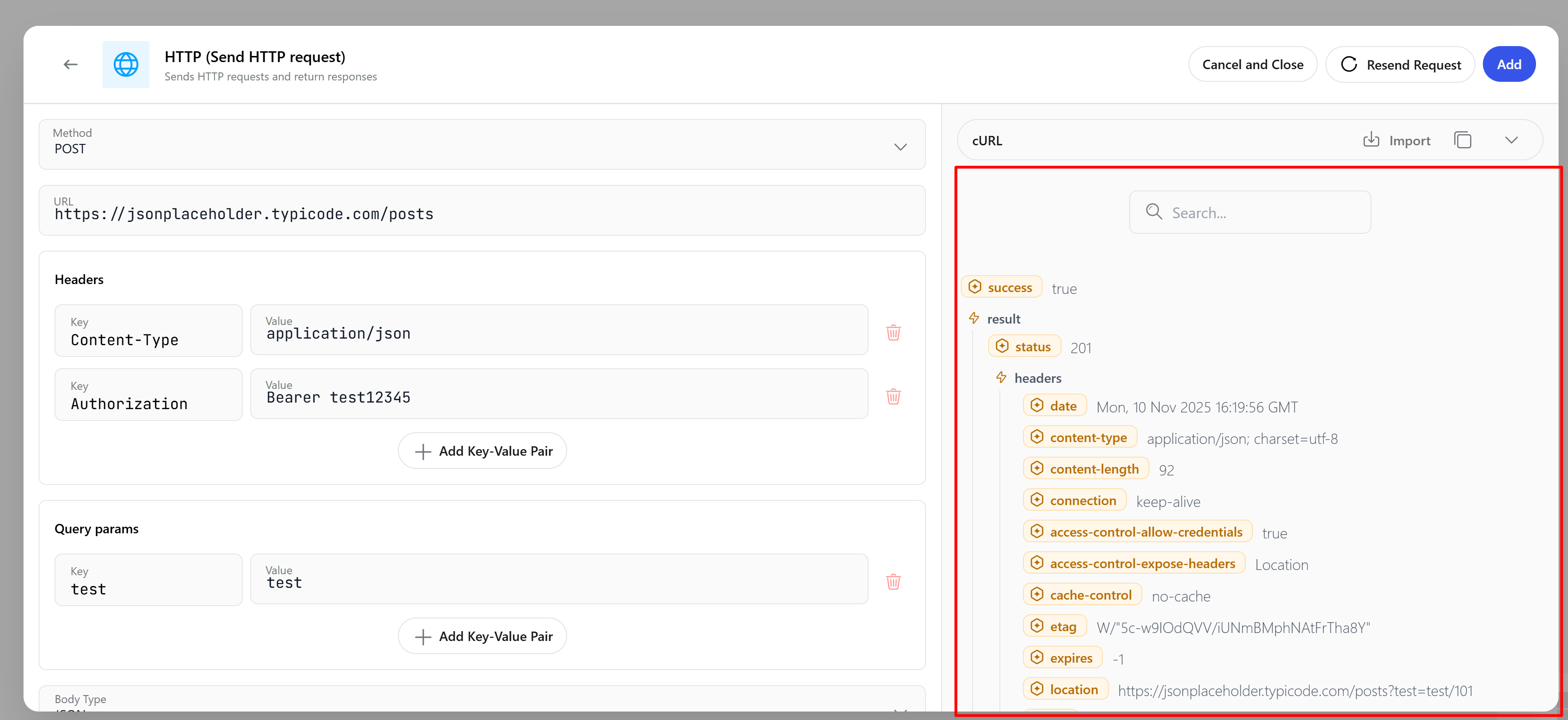
After configuring the request, you can test it by clicking the **Send Test Request** button in the upper-right corner. In the space on the right below this button, you'll see a detailed response with the status code and body.
### Testing Your Webhook
After configuring the request, you can test it by clicking the **Send Test Request** button in the upper-right corner. In the space on the right below this button, you'll see a detailed response with the status code and body.
 ### Configuring Webhook Triggers
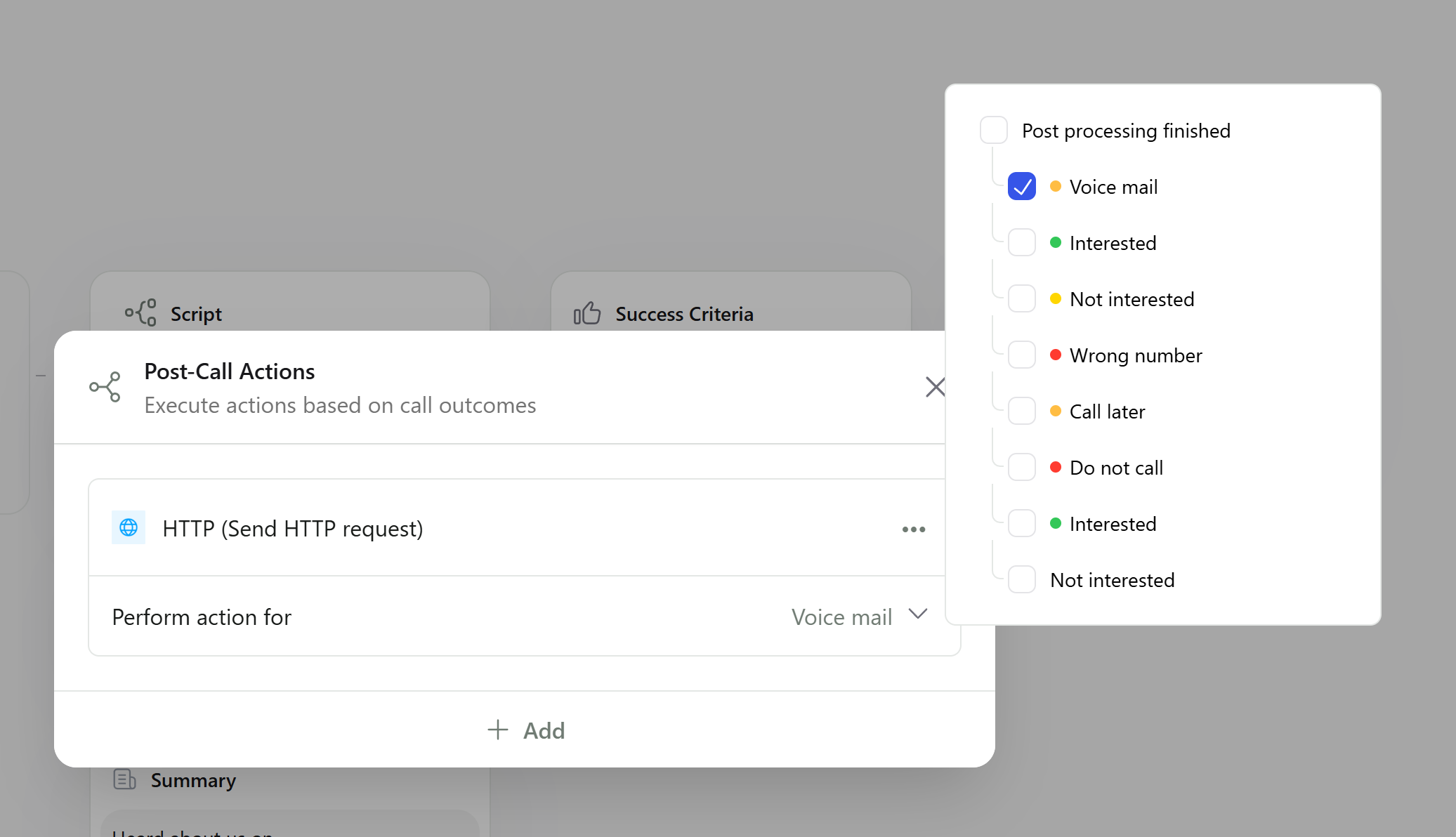
Finally, you need to define when the webhook will be sent. You can configure the webhook to trigger based on specific call statuses (for example, send the webhook only to interested leads).
### Configuring Webhook Triggers
Finally, you need to define when the webhook will be sent. You can configure the webhook to trigger based on specific call statuses (for example, send the webhook only to interested leads).
 ### Webhook payload example
Use the example below as a template when mapping fields inside downstream systems:
```json webhook.json theme={null}
{
"callStatus": "COMPLETED",
"createdAt": "2024-03-11T14:56:41.642Z",
"phoneFrom": "+15555551234",
"phoneTo": "+15555554321",
"status": "INTERESTED",
"postProcessStatus": "INTERESTED",
"hangUpReason": "CALL_FINISHED",
"duration": 128,
"totalDuration": 150,
"isIncoming": false,
"contactStatus": {
"callMeLater": false,
"doNotCall": false,
"wrongNumber": false
},
"conversationFlow": [],
"summary": {
"Inquiry Asked": {
"description": "Interested in learning more about our services",
"options": [],
"order": 1,
"type": "YES_NO",
"value": false
}
},
"campaign": {
"id": "{campaignId}",
"name": "{campaignName}"
},
"id": "{callId}",
"contact": {
"id": "{contactId}",
"name": "John",
"phoneNumber": "+1234567890",
"data": {
"email": "john@callers.ai",
"position": "Product Manager",
"company": "Callers"
}
},
"twilio": {
"accountSid": "{accountSid}",
"callSessionId": "{callSessionId}"
},
"organizationId": "{organizationId}",
"account": {
"id": "{organizationId}",
"name": "{organizationName}"
},
"transcript": [
{
"content": "Hello, this is Callers. How can I assist you today?",
"role": "Assistant"
},
{
"content": "Hi, can you tell me more about your services?",
"role": "user"
},
{
"content": "Certainly! We offer personalized AI calling services. Would you like to schedule a demo?",
"role": "Assistant"
},
{
"content": "Yes, that sounds great. Thank you!",
"role": "user"
},
{
"content": "You're welcome! I'll set that up and send you a confirmation. Have a great day!",
"role": "Assistant"
}
],
"interested": {
"description": "The caller showed interest in scheduling a demo, indicating a positive engagement.",
"reached": true
},
"successCriteria": {
"goalReached": true,
"description": "Customer agreed to schedule a demo",
"name": "Demo Scheduled",
"reason": "Positive response to scheduling request",
"type": "INTERESTED"
},
"events": [
{
"type": "SMS",
"data": {
"sent": true,
"status": "queued",
"sentAt": "2024-11-28T22:37:01.000Z",
"sentTo": "+1999999999",
"uri": "{uri}",
"smsSid": "{smsSid}",
"sentFrom": "+1999999999",
"text": "{smsTemplateText}"
}
},
{
"type": "FORWARD",
"data": {
"phoneNumber": "+1999999999",
"contactAsCallerId": true
}
}
],
"webhookUrl": "{webhookUrl}",
"webhookEvent": "CONNECTED",
"webhookEvents": [
"HANG_UP",
"CONNECTED",
"POST_PROCESSING_FINISHED:NOT_INTERESTED",
"POST_PROCESSING_FINISHED:CALL_ME_LATER",
"POST_PROCESSING_FINISHED:INTERESTED",
"POST_PROCESSING_FINISHED:VOICE_MAIL"
],
"webhookStatuses": [
"INTERESTED",
"NOT_INTERESTED",
"CALL_ME_LATER",
"WRONG_NUMBER",
"DO_NOT_CALL",
"COMPLETED",
"FAILED",
"VOICE_MAIL",
"BUSY",
"NO_ANSWER"
],
"isTestCall": false,
"sessionId": "{sessionId}",
"slackUrl": "{slackUrl}"
}
```
### Webhook fields reference
Refer to the table below for every field that can appear in the payload:
### Webhook payload example
Use the example below as a template when mapping fields inside downstream systems:
```json webhook.json theme={null}
{
"callStatus": "COMPLETED",
"createdAt": "2024-03-11T14:56:41.642Z",
"phoneFrom": "+15555551234",
"phoneTo": "+15555554321",
"status": "INTERESTED",
"postProcessStatus": "INTERESTED",
"hangUpReason": "CALL_FINISHED",
"duration": 128,
"totalDuration": 150,
"isIncoming": false,
"contactStatus": {
"callMeLater": false,
"doNotCall": false,
"wrongNumber": false
},
"conversationFlow": [],
"summary": {
"Inquiry Asked": {
"description": "Interested in learning more about our services",
"options": [],
"order": 1,
"type": "YES_NO",
"value": false
}
},
"campaign": {
"id": "{campaignId}",
"name": "{campaignName}"
},
"id": "{callId}",
"contact": {
"id": "{contactId}",
"name": "John",
"phoneNumber": "+1234567890",
"data": {
"email": "john@callers.ai",
"position": "Product Manager",
"company": "Callers"
}
},
"twilio": {
"accountSid": "{accountSid}",
"callSessionId": "{callSessionId}"
},
"organizationId": "{organizationId}",
"account": {
"id": "{organizationId}",
"name": "{organizationName}"
},
"transcript": [
{
"content": "Hello, this is Callers. How can I assist you today?",
"role": "Assistant"
},
{
"content": "Hi, can you tell me more about your services?",
"role": "user"
},
{
"content": "Certainly! We offer personalized AI calling services. Would you like to schedule a demo?",
"role": "Assistant"
},
{
"content": "Yes, that sounds great. Thank you!",
"role": "user"
},
{
"content": "You're welcome! I'll set that up and send you a confirmation. Have a great day!",
"role": "Assistant"
}
],
"interested": {
"description": "The caller showed interest in scheduling a demo, indicating a positive engagement.",
"reached": true
},
"successCriteria": {
"goalReached": true,
"description": "Customer agreed to schedule a demo",
"name": "Demo Scheduled",
"reason": "Positive response to scheduling request",
"type": "INTERESTED"
},
"events": [
{
"type": "SMS",
"data": {
"sent": true,
"status": "queued",
"sentAt": "2024-11-28T22:37:01.000Z",
"sentTo": "+1999999999",
"uri": "{uri}",
"smsSid": "{smsSid}",
"sentFrom": "+1999999999",
"text": "{smsTemplateText}"
}
},
{
"type": "FORWARD",
"data": {
"phoneNumber": "+1999999999",
"contactAsCallerId": true
}
}
],
"webhookUrl": "{webhookUrl}",
"webhookEvent": "CONNECTED",
"webhookEvents": [
"HANG_UP",
"CONNECTED",
"POST_PROCESSING_FINISHED:NOT_INTERESTED",
"POST_PROCESSING_FINISHED:CALL_ME_LATER",
"POST_PROCESSING_FINISHED:INTERESTED",
"POST_PROCESSING_FINISHED:VOICE_MAIL"
],
"webhookStatuses": [
"INTERESTED",
"NOT_INTERESTED",
"CALL_ME_LATER",
"WRONG_NUMBER",
"DO_NOT_CALL",
"COMPLETED",
"FAILED",
"VOICE_MAIL",
"BUSY",
"NO_ANSWER"
],
"isTestCall": false,
"sessionId": "{sessionId}",
"slackUrl": "{slackUrl}"
}
```
### Webhook fields reference
Refer to the table below for every field that can appear in the payload:
| Field | Description |
|---|---|
createdAt |
Timestamp when the call was initiated in ISO 8601 format. |
phoneFrom |
Phone number from which the call originated. |
status |
Composite status of a call. It includes the call status, the reason for call hang up, and the candidate status. Call progress status:
Call connection status:
Contact response to call:
|
callStatus |
Call status:
|
postProcessStatus |
Candidate status for that call:
|
events |
Details about specific call events:
|
webhookUrl |
URL to which the Webhook data is sent post-call. |
webhookEvent |
Event related to the webhook trigger:
|
webhookEvents |
List of selected events for triggering the webhook. |
hangUpReason |
Reason for the call termination:
|
duration |
Duration of the call with Callers' agent in seconds. |
totalDuration |
Total duration of the call including the forwarded call duration in seconds. |
contactStatus |
Object indicating the contact's preferences:
|
summary |
Object summarizing the Key Questions made during the call. |
campaign |
Information about the campaign associated with the call:
|
id |
Unique identifier for the call. |
contact |
Details about the person contacted:
|
twilio |
Twilio information:
|
organizationId |
Unique identifier for the organization. |
transcript |
Array of dialogue exchanges during the call, with each entry detailing the content spoken and the role of the speaker. |
interested |
Object detailing whether the caller expressed interest in the services:
|
successCriteria |
Object detailing the success criteria evaluation for the call:
|
isTestCall |
Boolean indicating if the call was a test call. |
slackUrl |
Webhook Url if the account is integrated with Slack. |