> ## Documentation Index
> Fetch the complete documentation index at: https://docs.callers.ai/llms.txt
> Use this file to discover all available pages before exploring further.
# Pre-Call Chat
> Send an AI-powered text message before dialing to ask contacts if they want to receive your call - boosting answering rates and reducing wasted dial attempts.
## What Is Pre-Call Chat?
Pre-Call Chat is an optional step you can add to any outgoing voice campaign. Instead of dialing a contact cold, Callers first sends them an AI-powered SMS or WhatsApp message asking if they'd like to receive your call. Contacts who say yes are far more likely to pick up - turning a reluctant ring into a warm, expected conversation.
Pre-Call Chat requires a messaging channel (SMS or WhatsApp) to be connected to your account. See [Twilio SMS](/documentation/text-campaigns/twilio-sms), [Telnyx SMS](/documentation/text-campaigns/telnyx-sms), or [WhatsApp](/documentation/text-campaigns/whatsapp) to get started.
## Why Use It?
Contacts who've already agreed to a call are significantly more likely to pick up when you dial them.
Skip contacts who aren't available or interested right now, saving dial attempts for people who actually want to talk.
Asking permission before calling feels respectful and professional, which sets a positive tone before the conversation even starts.
Choose what happens when contacts don't reply or decline - proceed anyway, reschedule, or stop.
## How It Works
When your campaign is active, Callers sends your configured opening message to the contact via SMS or WhatsApp before any call is attempted.
The AI reads their response and determines whether they've agreed to the call, declined, or haven't replied yet.
Based on the reply (or lack of one), the system either places the voice call, reschedules it for a working window, or moves on - according to your configuration.
***
## Configuration
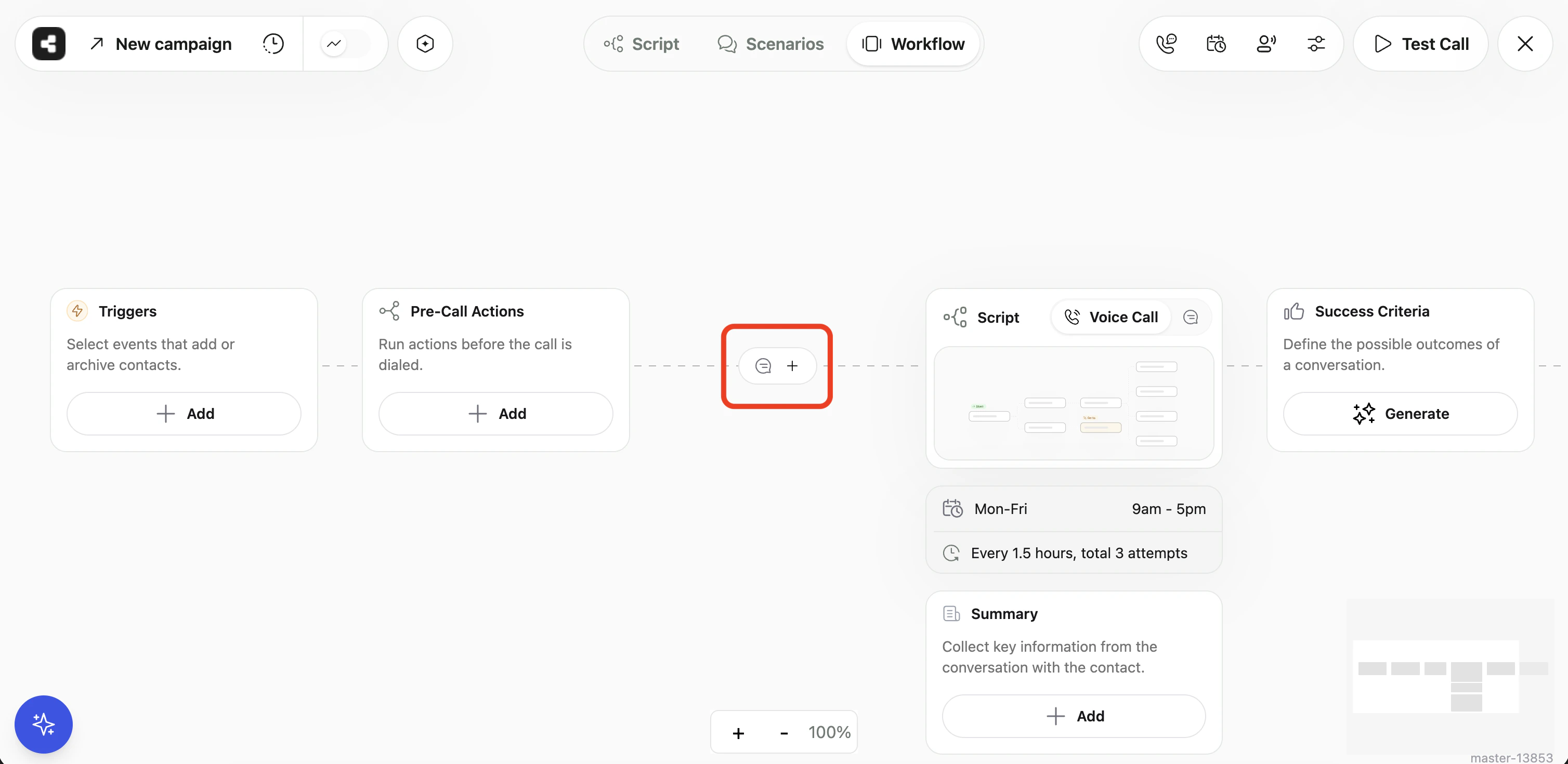
Pre-Call Chat is configured from the **Workflow** tab of your campaign. Click the **Pre-Call Chat** node in the workflow diagram to open the settings panel.
 ### Initial Message
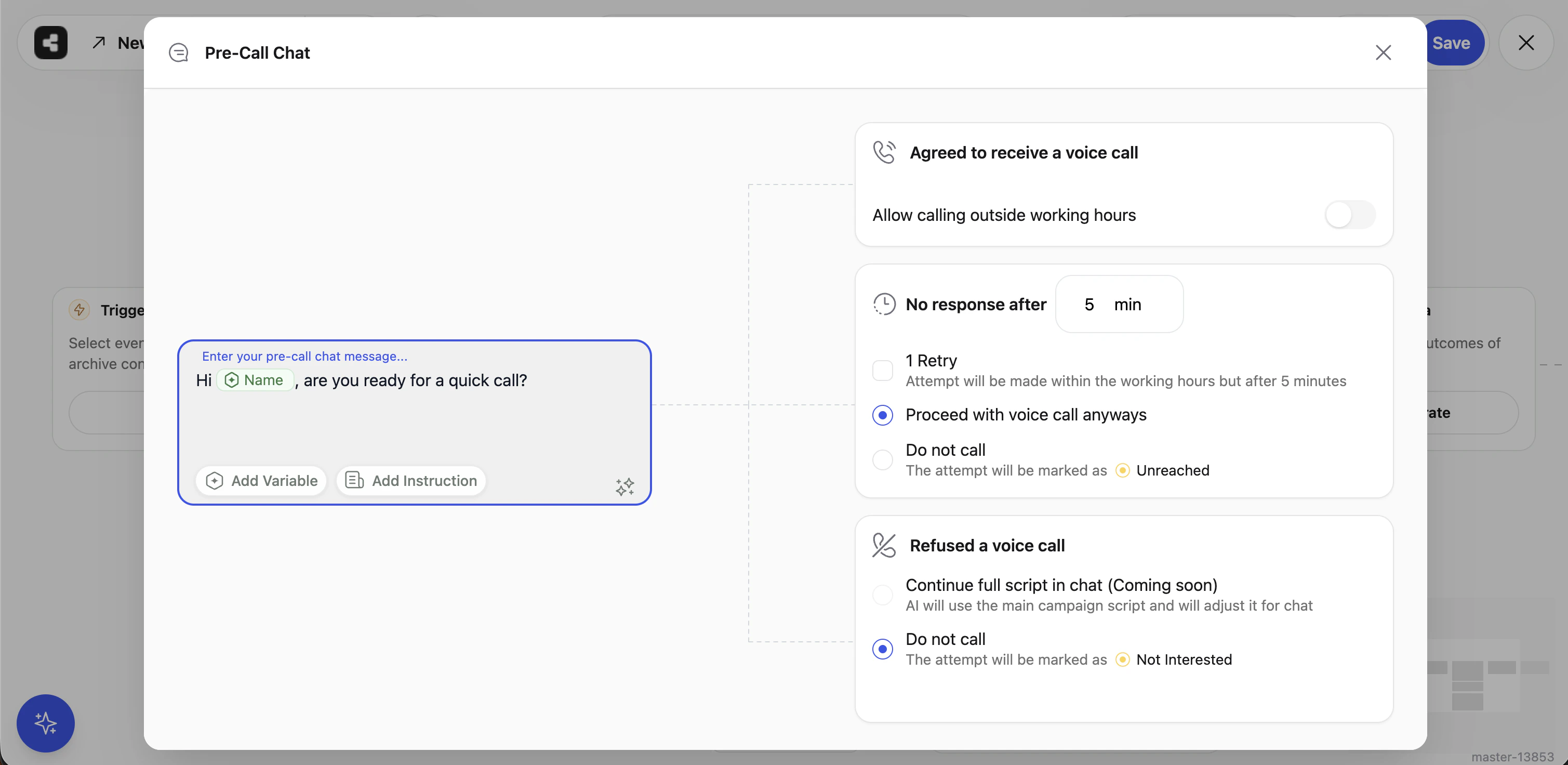
Write the message that will be sent to contacts before dialing. This is your first touchpoint, so keep it concise and clear. You can personalize it with campaign variables and use the built-in AI rephrase tool to refine your wording.
### Initial Message
Write the message that will be sent to contacts before dialing. This is your first touchpoint, so keep it concise and clear. You can personalize it with campaign variables and use the built-in AI rephrase tool to refine your wording.
 ***
### When the Contact Agrees
If the contact replies and the AI determines they've approved the call, Callers will proceed to dial them. One setting controls the timing:
**Allow calling outside working hours**
| Setting | Behavior |
| ------------- | ------------------------------------------------------------------------------------------------------------------------- |
| Off (default) | The call is placed at the start of the next available working window as defined in your campaign's availability settings. |
| On | The call is placed immediately, even if it's currently outside your campaign's calling hours. |
***
### When the Contact Doesn't Reply
Control what happens if a contact receives your message but never responds.
**Response timeout**
Set how long (in minutes) Callers waits for a reply before treating it as no response. The minimum is 1 minute; the maximum is 1,440 minutes (24 hours).
**Send a follow-up nudge**
Enable this to send one additional follow-up message after the timeout expires before giving up. This gives unresponsive contacts a second chance to confirm.
**No-response action**
| Option | What happens |
| ----------------------- | ----------------------------------------------------------------------------------------------------------------------------- |
| Proceed with voice call | The call is placed anyway, just as if the contact had agreed. The contact is re-queued and dialed at the next working window. |
| Do not call | The contact is marked as **Unreached** and no call is made. |
***
### When the Contact Declines
If the contact's reply indicates they don't want a call, you can choose what happens next.
| Option | What happens |
| ---------------------------- | ---------------------------------------------------------------------------------------------- |
| Do not call | The contact is marked as **Not Interested** and no call is made. |
| Continue full script in chat | *(Coming soon)* The conversation continues as a regular text campaign instead of a voice call. |
***
## Contact Statuses After Pre-Call Chat
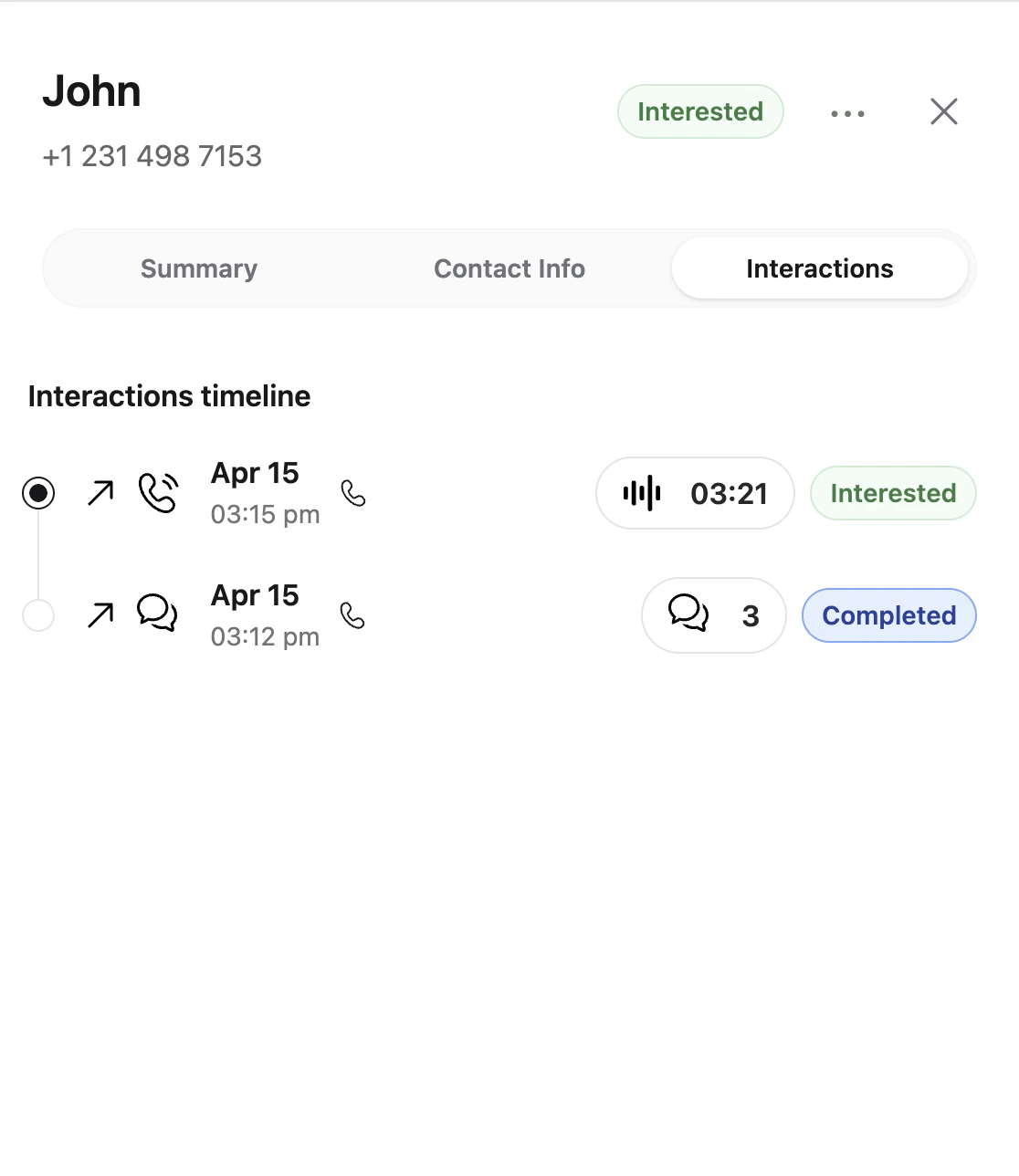
After the pre-call chat concludes, each contact receives one of the following outcomes:
| Outcome | Contact Status | Description |
| ------------------------------ | ------------------ | ---------------------------------------------------------------------- |
| Approved → call within hours | **Calling** | Contact agreed and the call is placed immediately. |
| Approved → call in next window | **Pending Retry** | Contact agreed and the call will be placed at the next working window. |
| Declined | **Not Interested** | Contact explicitly refused the call. |
| No response → Do not call | **Unreached** | Contact didn't reply and the no-response action is set to Do Not Call. |
| No response → Proceed | **Pending Retry** | Contact didn't reply but the campaign is configured to call anyway. |
| Technical failure | **Pending Retry** | The chat couldn't be delivered; the contact re-enters the queue. |
***
### When the Contact Agrees
If the contact replies and the AI determines they've approved the call, Callers will proceed to dial them. One setting controls the timing:
**Allow calling outside working hours**
| Setting | Behavior |
| ------------- | ------------------------------------------------------------------------------------------------------------------------- |
| Off (default) | The call is placed at the start of the next available working window as defined in your campaign's availability settings. |
| On | The call is placed immediately, even if it's currently outside your campaign's calling hours. |
***
### When the Contact Doesn't Reply
Control what happens if a contact receives your message but never responds.
**Response timeout**
Set how long (in minutes) Callers waits for a reply before treating it as no response. The minimum is 1 minute; the maximum is 1,440 minutes (24 hours).
**Send a follow-up nudge**
Enable this to send one additional follow-up message after the timeout expires before giving up. This gives unresponsive contacts a second chance to confirm.
**No-response action**
| Option | What happens |
| ----------------------- | ----------------------------------------------------------------------------------------------------------------------------- |
| Proceed with voice call | The call is placed anyway, just as if the contact had agreed. The contact is re-queued and dialed at the next working window. |
| Do not call | The contact is marked as **Unreached** and no call is made. |
***
### When the Contact Declines
If the contact's reply indicates they don't want a call, you can choose what happens next.
| Option | What happens |
| ---------------------------- | ---------------------------------------------------------------------------------------------- |
| Do not call | The contact is marked as **Not Interested** and no call is made. |
| Continue full script in chat | *(Coming soon)* The conversation continues as a regular text campaign instead of a voice call. |
***
## Contact Statuses After Pre-Call Chat
After the pre-call chat concludes, each contact receives one of the following outcomes:
| Outcome | Contact Status | Description |
| ------------------------------ | ------------------ | ---------------------------------------------------------------------- |
| Approved → call within hours | **Calling** | Contact agreed and the call is placed immediately. |
| Approved → call in next window | **Pending Retry** | Contact agreed and the call will be placed at the next working window. |
| Declined | **Not Interested** | Contact explicitly refused the call. |
| No response → Do not call | **Unreached** | Contact didn't reply and the no-response action is set to Do Not Call. |
| No response → Proceed | **Pending Retry** | Contact didn't reply but the campaign is configured to call anyway. |
| Technical failure | **Pending Retry** | The chat couldn't be delivered; the contact re-enters the queue. |
 ***
## Frequently Asked Questions
No. Pre-Call Chat only controls the outreach message sent *before* the call. Your full campaign script runs as normal once the voice call connects.
Yes - SMS (via Twilio or Telnyx) and WhatsApp are both supported. Make sure your messaging channel is connected before enabling Pre-Call Chat.
Callers uses an AI analysis step to interpret the contact's reply. It determines the most likely intent (approved, declined, or unclear) along with a confidence score. Ambiguous replies that can't be confidently classified are treated as no-response, and the configured no-response action applies.
Pre-Call Chat activity (messages sent, replies received, outcomes) is tracked alongside your standard campaign analytics. Contact statuses update in real time as chats conclude.
Yes. Any variable defined under Campaign Variables is available to use in the initial message.
***
## Frequently Asked Questions
No. Pre-Call Chat only controls the outreach message sent *before* the call. Your full campaign script runs as normal once the voice call connects.
Yes - SMS (via Twilio or Telnyx) and WhatsApp are both supported. Make sure your messaging channel is connected before enabling Pre-Call Chat.
Callers uses an AI analysis step to interpret the contact's reply. It determines the most likely intent (approved, declined, or unclear) along with a confidence score. Ambiguous replies that can't be confidently classified are treated as no-response, and the configured no-response action applies.
Pre-Call Chat activity (messages sent, replies received, outcomes) is tracked alongside your standard campaign analytics. Contact statuses update in real time as chats conclude.
Yes. Any variable defined under Campaign Variables is available to use in the initial message.